Using GitHub Issues as a Blog CMS Without Breaking SEO
I wanted to add a blog to my portfolio without introducing a database, an admin dashboard, or a traditional CMS.
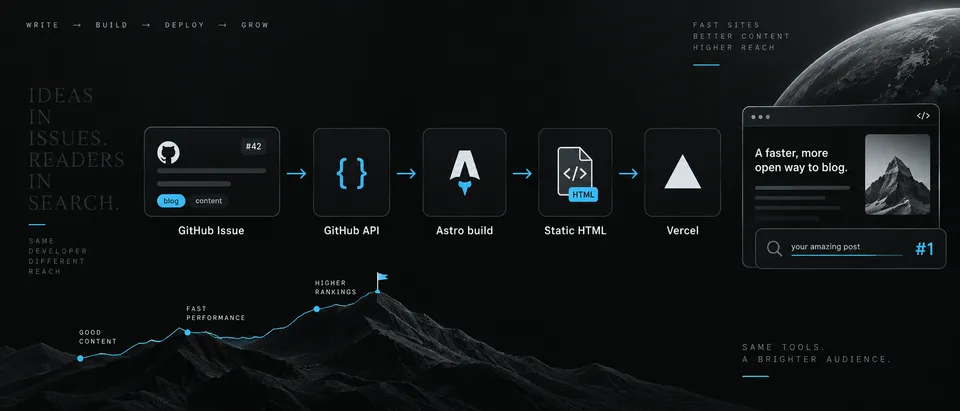
The solution was simpler than expected: use GitHub Issues as the content source, let Astro turn those Issues into static pages, and automatically redeploy the site whenever a published article changes.
The architecture looks like this:
GitHub Issue
    ↓
GitHub REST API
    ↓
Astro build
    ↓
Markdown parsing
    ↓
Image optimization
    ↓
Static HTML
    ↓
Vercel
GitHub becomes the editor, Astro becomes the renderer, and the deployed website stays completely static.
Why GitHub Issues?
GitHub Issues already provide most of what I need from a lightweight CMS:
- Markdown editing
- image uploads
- labels
- editing history
- timestamps
- authentication
- a good writing interface
A blog post is simply an open Issue with the published label.
For example:
Issue title:
Using GitHub Issues as a Blog CMS

State:
Open

Label:
published
During the Astro build, the site requests only open Issues containing that label.
const response = await fetch(
  `https://api.github.com/repos/${owner}/${repo}/issues?state=open&labels=published`,
  {
    headers: {
      Authorization: `Bearer ${token}`,
      Accept: "application/vnd.github+json",
    },
  }
);
The GitHub token exists only during the build and is stored as an environment variable.
It is never exposed to the browser.
Turning an Issue Into a Blog Post
GitHub gives us the information we need directly from the Issue:
{
  number,
  title,
  body,
  labels,
  created_at,
  updated_at
}
That becomes an internal blog model:
interface BlogPost {
  id: number;
  title: string;
  slug: string;
  body: string;
  description: string;
  publishedAt: string;
  updatedAt: string;
  tags: string[];
  coverImage?: string;
}
The Issue title becomes the page title and slug.
Using GitHub Issues as a Blog CMS

↓

using-github-issues-as-a-blog-cms

↓

/blog/using-github-issues-as-a-blog-cms
The Issue body becomes the article content.
The Issue creation date becomes the publication date, while updated_at becomes the last modified date.
Adding Metadata Without Making the Issue Ugly
At the beginning of each Issue, I use a small HTML comment:
<!--
description: How GitHub Issues can work as a lightweight CMS for an Astro blog.
cover: https://github.com/user-attachments/assets/example
-->
Because it is inside an HTML comment, it does not clutter the rendered Issue.
The build extracts these values before rendering the Markdown.
The important detail is that the cover field contains the stable GitHub attachment URL, not an HTML <img> element.
Use:
https://github.com/user-attachments/assets/...
instead of:
<img src="..." />
This keeps the metadata easy to parse.
Automatic Publishing
I did not want to manually open Vercel every time I published or edited a post.
So the Issue repository also contains a GitHub Action.
The workflow listens for Issue events such as:
opened
labeled
edited
reopened
closed
unlabeled
The important publishing rule is:
Issue is OPEN
+
Issue has "published"
=
should exist on the blog
When this condition becomes true, GitHub Actions sends a POST request to a Vercel Deploy Hook.
Create/open Issue
      ↓
add "published"
      ↓
GitHub Action
      ↓
POST Vercel Deploy Hook
      ↓
Vercel starts new build
      ↓
Astro fetches Issues again
      ↓
new article becomes available
A simplified workflow looks like this:
name: Auto Post new Blog trigger on every new github issue

on:
  issues:
    types:
      - labeled
      - edited
      - reopened
      - closed
      - unlabeled

concurrency:
    group: blog-post
    cancel-in-progress: true
jobs:
    Deploy-Production:
        runs-on: ubuntu-latest
        if: |
            (
                github.event.issue.state == 'open' &&
                contains(github.event.issue.labels.*.name, 'published') &&
                (github.event.action == 'labeled' || github.event.action == 'edited' || github.event.action == 'reopened')
            )
            ||
            (
                github.event.action == 'closed' && contains(github.event.issue.labels.*.name, 'published')
            )
            ||
            (
                github.event.action == 'unlabeled' && github.event.label.name == 'published'
            )
        steps:
            - name: Trigger Vercel deployment
              env:
                DEPLOY_HOOK: ${{ secrets.DEPLOY_HOOK }}
              run: curl --fail-with-body --silent --show-error --request POST "$DEPLOY_HOOK"
The curl command is intentionally simple.
It only sends a POST request to the secret Vercel Deploy Hook URL.
GitHub Action
      ↓
   POST
      ↓
   Vercel
      ↓
new deployment
The concurrency section prevents multiple unnecessary builds from piling up.
If I edit the same article several times quickly:
edit #1
edit #2
edit #3
GitHub may start multiple workflow runs.
With:
concurrency:
  group: blog-post
  cancel-in-progress: true
the old deployment trigger is cancelled and the newest change wins.
The Most Important SEO Decision
The GitHub API is never called from the visitor's browser.
I wanted to avoid this architecture:
Browser
   ↓
Empty HTML
   ↓
JavaScript
   ↓
GitHub API
   ↓
Markdown
   ↓
Render article
Instead, Astro does everything during the build:
GitHub Issue
    ↓
Astro build
    ↓
Generate complete HTML
    ↓
Deploy
When someone opens:
/blog/using-github-issues-as-a-blog-cms
the HTML already contains:
<h1>Using GitHub Issues as a Blog CMS</h1>

<p>
  I wanted to add a blog to my portfolio without introducing a database...
</p>
The search engine does not have to execute JavaScript to discover the article.
That gives the blog the same basic SEO characteristics as a normal statically generated website.
Static Routes With Astro
Astro generates each blog route during the build using getStaticPaths().
export async function getStaticPaths() {
  const posts = await getBlogPosts();

  return posts.map((post) => ({
    params: {
      slug: post.slug,
    },
    props: {
      post,
    },
  }));
}
If three Issues are published:
How I Built Amadil
Understanding Nginx Load Balancing
Using GitHub Issues as a Blog CMS
Astro generates:
/blog/how-i-built-amadil
/blog/understanding-nginx-load-balancing
/blog/using-github-issues-as-a-blog-cms
These are normal static pages.
SEO Metadata
Each article generates its own metadata.
<title>
  Using GitHub Issues as a Blog CMS Without Breaking SEO
</title>

<meta
  name="description"
  content="How I use GitHub Issues as a lightweight blog CMS while keeping Astro static generation and SEO working as expected."
/>

<link
  rel="canonical"
  href="https://haguezoum.site/blog/using-github-issues-as-a-blog-cms"
/>
The page also includes Open Graph metadata:
<meta property="og:type" content="article" />
<meta property="og:title" content="Using GitHub Issues as a Blog CMS" />
<meta property="og:description" content="..." />
<meta property="og:url" content="..." />
<meta property="og:image" content="..." />
This also improves how the post appears when shared on platforms such as LinkedIn, Discord, Slack, and messaging apps.
Appreciate that you are reaching here and reading the my first blog Thank you ❤️
Hassan Aguezoum